Consent Types
BlinkPay supports multiple consent types to accommodate different payment and data access scenarios. Choosing the right consent type is crucial for optimal user experience and compliance.
Overview of Consent Types
| Consent Type | Use Case | Payment Count | Duration | API Endpoint |
|---|---|---|---|---|
| Single Consent | One-off payment | 1 | One-time | POST /single-consents |
| Quick Payment | Simplified one-off | 1 | One-time | POST /quick-payments |
| Enduring Consent | Recurring payments | Multiple | Until revoked/expired | POST /enduring-consents |
| Data Consent | Account information | N/A | Until revoked/expired | POST /consents |
Single Consent
Purpose: Traditional two-step payment flow for one-off transactions
Characteristics
- ✅ Customer reviews and authorises payment amount before approval
- ✅ Clear distinction between consent and payment execution
- ✅ Maximum control and transparency for customer
- ✅ Can only be used once
- ❌ Requires two API calls (consent + payment)
When to Use
Use single consents when:
- Customer needs to review exact amount before authorisation
- You need time between authorisation and payment execution
- Compliance requires explicit amount approval
- You're processing standard e-commerce purchases
Flow
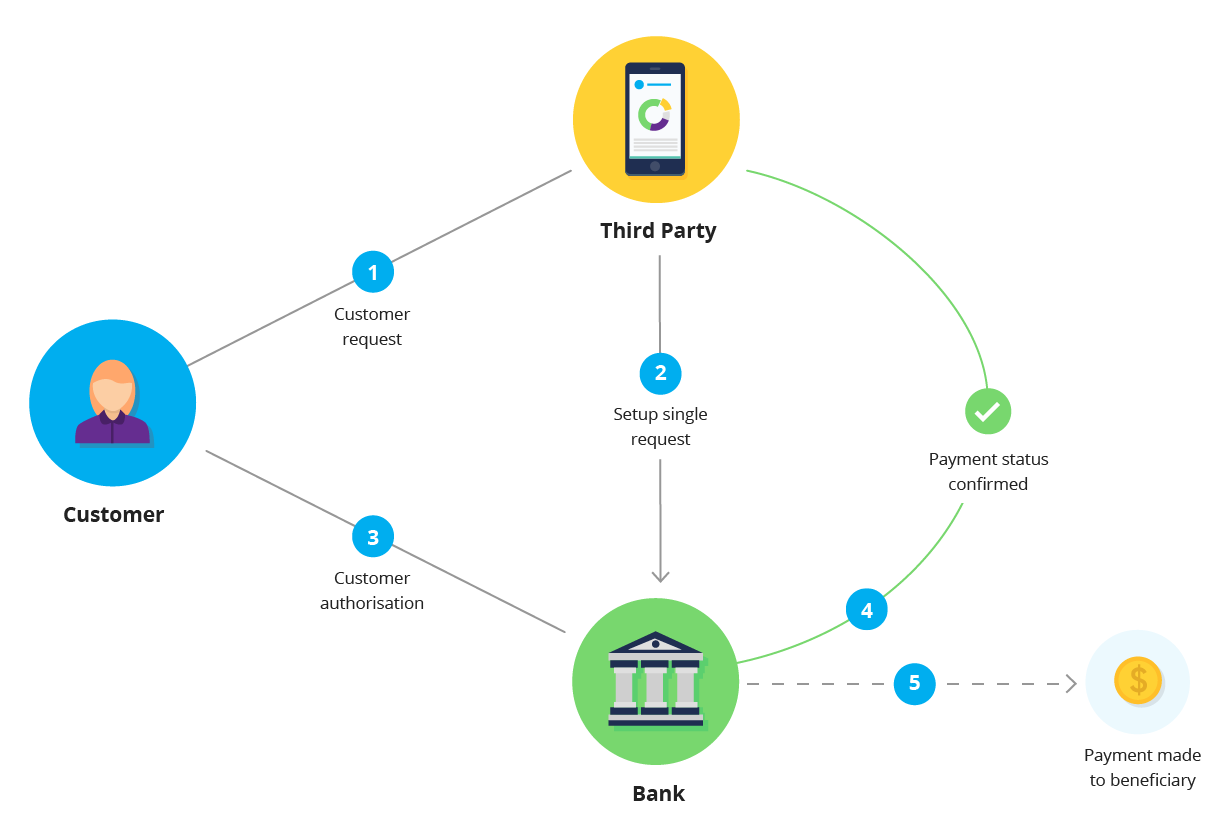
Lifecycle
Status progression: GatewayAwaitingSubmission (gateway flow only) → AwaitingAuthorisation → Authorised → Consumed
Once the consent is Authorised, create the payment with POST /payments/v1/payments, sending only the consent_id: the amount and PCR come from the consent, and sending amount or pcr is rejected with 400 BP235. Pay within 48 hours of the consent becoming Authorised (its status_updated_timestamp); after that it becomes Rejected.
What happens if the bank refuses the payment depends on when it does so:
| Bank response | Payment | Consent | What you can do |
|---|---|---|---|
| Refuses the payment outright | Rejected | Stays Authorised | Handle it as a failed payment. If the customer resolves the cause (for example insufficient funds), you may create another payment on the same consent, with a new idempotency-key, within the 48 hours |
| Accepts it, then rejects it later | Rejected | Consumed | Nothing on this consent (422 BP002); create a new consent |
| Accepts and settles it | AcceptedSettlementCompleted | Consumed | Nothing further; the consent cannot be reused |
So Consumed means the consented action is complete, not that the customer paid: always read the payment's status. consent.payments[0] is the most recent payment.
To cancel an unused single consent, call DELETE /payments/v1/single-consents/{consent_id} (204). It is refused with 409 while a payment is in flight; see Error Codes.
For complete API request/response examples, see the OpenAPI specification or our SDK documentation on GitHub.
Quick Payment
Purpose: Streamlined single payment: the consent and payment are created together
Characteristics
- ✅ One API call combines consent + payment
- ✅ Faster integration and simpler code
- ✅ No separate
POST /paymentscall: retrieving the quick payment completes it - ✅ Best for straightforward checkout flows
- ⚠️ Amount is locked at consent creation
- ⚠️ Cannot defer payment execution
When to Use
Use quick payments when:
- You need the simplest possible integration
- Payment should execute immediately after authorisation
- Amount is final at checkout
- You don't need to defer payment timing
- User experience priority is speed
Flow
Quick payments follow the same flow as single consents, without the POST /payments step. For a bank payment, retrieve the quick payment with GET /payments/v1/quick-payments/{quick_payment_id} as soon as the customer returns; the gateway normally does this for you, and calling it again is safe. That call completes the payment. In the decoupled flow the payment is submitted at authorisation, and a card payment is taken at the gateway.
A quick payment has at most one payment, and the quick_payment_id is also its consent ID (cid on the return URL). If it fails, create a new quick payment; POST /payments on a quick payment is rejected with 422 BP018.
Comparison with Single Consent
| Feature | Single Consent | Quick Payment |
|---|---|---|
| API Calls | 2 (consent + payment) | 1 (combined), then GET |
| Payment Timing | Controlled (within 48 hours) | When you GET it after authorisation (decoupled: at authorisation) |
| Code Complexity | Higher | Lower |
| Amount Changes | Fixed at consent | Fixed at consent |
| Use Case | Flexible | Simple |
A single consent fixes the amount and PCR at consent creation, so the payment call carries only the consent_id.
Quick Payment Recommendation
For most e-commerce checkouts, quick payments provide the best balance of simplicity and functionality. Use single consents only if you need to defer payment execution.
Enduring Consent
Purpose: Recurring payments for subscriptions and scheduled billing
Characteristics
- ✅ Multiple payments from one authorisation
- ✅ You set the maximum amounts and period; the customer reviews and approves them at their bank
- ✅ Flexible payment amounts within limits
- ✅ Customer can revoke anytime
- ✅ Optional expiry date
- ⚠️ Requires careful compliance handling
When to Use
Use enduring consents when:
- Processing subscription payments
- Recurring billing (monthly, weekly, etc.)
- Variable amounts within agreed limits
- Long-term payment relationship
- Customer wants ongoing authorisation
Key Parameters
| Parameter | Purpose | Example |
|---|---|---|
maximum_amount_period | Maximum total amount per billing period | $500.00 |
maximum_amount_payment | Maximum per individual payment | $100.00 |
period | Billing period frequency | daily, weekly, fortnightly, monthly, annual |
from_timestamp | Period calculation start date | 2025-01-01T00:00:00Z |
expiry_timestamp | Optional consent expiry date | 2026-01-01T00:00:00Z |
Period Calculation
The billing period is counted from from_timestamp, not from calendar months. A period that starts on the 31st runs to the end of a shorter month. For example, a monthly consent starting January 1:
- Jan 1-31: Up to $500 total
- Feb 1-28: Period resets, another $500 available
- Mar 1-31: Period resets again
Period Tracking
The period starts from from_timestamp, not from the first payment. Track what you have taken in each period in your application.
Variable Amounts
Enduring consents support variable payment amounts. Each payment can be for a different amount, as long as:
- Individual payment ≤
maximum_amount_payment - Total in period ≤
maximum_amount_period
A payment over maximum_amount_payment is rejected with 400 BP263, and a single payment larger than maximum_amount_period with 400 BP262. If the period's allowance is used up, the payment is rejected with 422 BP044 or BP036; wait for the next period.
Indefinite Consents
Omit expiry_timestamp for consents that don't expire. The consent remains valid until it is revoked.
After expiry_timestamp the consent is Consumed, and a payment against it is rejected with 422 BP003. A consent cannot be renewed or extended: create a new one and ask the customer to authorise it.
Customer Control
Customers can revoke enduring consents at any time through their bank. Always handle revocation gracefully and provide a way for customers to revoke through your app as well.
Managing Enduring Consents
- Check status before creating payments - verify consent is still
Authorised - Handle revocation - a consent revoked at the customer's bank shows as
Revokedwhen you next read it, andPOST /paymentsreturns422BP015. See Notifications - Programmatic revocation - use DELETE endpoint to revoke:
DELETE /payments/v1/enduring-consents/{consent_id}
For complete API examples, see the OpenAPI specification or our SDK documentation on GitHub.
Data Consent
Purpose: Access customer account information (balances, transactions, account details)
Data consents are part of Blink Data, a separate product from payment processing. For complete documentation including permissions and implementation, see the Blink Data documentation.
Choosing the Right Consent Type
Decision Tree
Need to access account data?
├─ Yes → Data Consent
└─ No → Need recurring payments?
    ├─ Yes → Enduring Consent
    └─ No → Need to defer payment execution?
        ├─ Yes → Single Consent
        └─ No → Quick Payment
Use Case Matrix
| Use Case | Recommended Consent | Why |
|---|---|---|
| E-commerce checkout | Quick Payment | Simplest, fastest |
| Invoice payment with approval | Single Consent | Review before payment |
| Monthly subscription | Enduring Consent | Recurring authorisation |
| Pay-per-use service | Enduring Consent | Variable amounts |
| Loan application | Data Consent | Need account verification |
| Budgeting app | Data Consent | Transaction history access |
| One-time donation | Quick Payment | Simple flow |
| Escrow payment | Single Consent | Delayed execution |
Best Practices
✅ Do:
- Choose the simplest consent type for your use case
- Explain to customers what they're authorising
- Set reasonable maximums for enduring consents
- Provide easy revocation process
- Test all flows in sandbox
❌ Don't:
- Use enduring consents for one-off payments
- Set unrealistic maximum amounts
- Forget to handle consent revocation
- Assume indefinite consent validity
Consent Comparison Summary
| Aspect | Single | Quick | Enduring | Data |
|---|---|---|---|---|
| API Calls | 2 | 1 | 2+ | 1 |
| Use Count | Once | Once | Multiple | Multiple |
| Duration | One-time | One-time | Until revoked | Until expiry/revoked |
| Amount | Fixed | Fixed | Variable | N/A |
| Timing | Controlled | Immediate | Scheduled | On-demand |
| Complexity | Medium | Low | High | Medium |