Decoupled Flow
Decoupled Flow (also known as Pay by Mobile) allows customers to authorise on a different device or at a different time using their banking mobile app. The bank sends the request straight to the customer's banking app, using an identifier such as their mobile number. Some banks send a push notification; with others the customer opens the app and goes to its notifications or messages section to approve. It works for a Blink Payments payment and for a Blink Data account access consent alike: the bank sends the same kind of authorisation request to the customer's app, and only what they are approving differs.
Overview
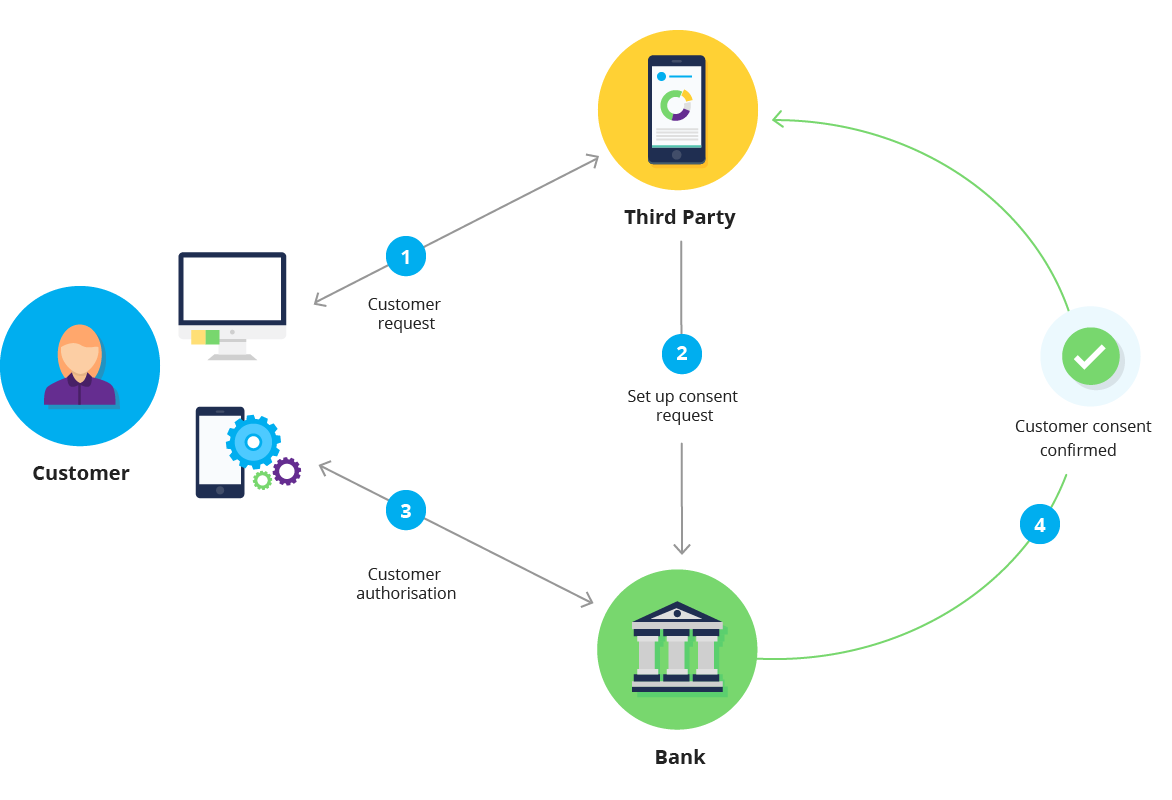
Decoupled Flow separates the authorisation process from the initial request:
- Customer starts a payment, or a request to share account information, on your website or app
- You create a consent with decoupled flow
- Customer receives an authorisation request on their mobile device
- Customer authorises using their banking app
- You poll for authorisation status, then create the payment or start retrieving data
When to Use Decoupled Flow
Decoupled Flow is best for scenarios where authorisation happens asynchronously—bill payment systems, desktop-initiated transfers where customers prefer mobile authorisation, recurring payment setup, and returning customers with saved payment methods.
For most integrations, Gateway Flow is recommended as it handles flow selection automatically. If customers are already on mobile, consider the Redirect Flow, which opens the banking app on mobile for banks that support it.
Bank Support
Decoupled Flow Support by Bank
| Bank | Identifier | How the Customer Sees the Request |
|---|---|---|
| ANZ | Mobile number or consent ID | goMoney notification on iOS; on Android, the customer opens goMoney to approve |
| ASB | Mobile number or consent ID | Push notification, if enabled in app settings |
| BNZ | Mobile number, email or consent ID | Push notification |
| Kiwibank | Mobile number or consent ID | No push notification: the customer opens the app to approve |
| NZHL | Mobile number or consent ID | Tell the customer to open their app if no notification arrives |
| Westpac | Access Number (banking username) or consent ID | Push notification, if enabled in app settings |
A consent ID here means the ID of a consent your application created earlier for the same customer at the same bank, and which was authorised; see the Using Previous Consents tip under Step 1.
When There Is No Push Notification
On your waiting screen, always tell the customer to open their banking app and look for the request if no notification arrives: Kiwibank sends none, ANZ sends none on Android, and customers may have notifications turned off.
Integration Steps
Step 1: Collect the Customer's Identifier
Decoupled flow needs an identifier that tells the bank which customer to send the request to. You send it as identifier_type and identifier_value:
| Bank | Accepted identifier_type values |
|---|---|
| ANZ | mobile_number, consent_id |
| ASB | mobile_number, consent_id |
| BNZ | mobile_number, email, consent_id |
| Kiwibank | mobile_number, consent_id |
| NZHL | mobile_number, consent_id |
| Westpac | banking_username (the customer's Westpac Access Number), consent_id |
Send the customer's mobile number as mobile_number (Westpac takes banking_username instead); use mobile_number, not phone_number. An identifier type the bank doesn't accept is rejected when you create the consent. An identifier value the bank doesn't recognise, such as a mobile number not registered for its app, is not an error: the consent is created, stays AwaitingAuthorisation and becomes Rejected when the bank's window ends, exactly as if the customer had ignored the request.
Using Previous Consents
For a returning customer, set identifier_type to consent_id and identifier_value to the ID of an earlier consent your application created for that customer at the same bank. It must be Authorised or Consumed, not revoked, and the customer then enters nothing. If the bank rejects an old consent as an identifier, fall back to the customer's usual identifier.
Step 2: Create Consent with Decoupled Flow
The flow object, with the bank, the identifier and an optional callback_url, is the same for every consent type on both products.
Blink Payments — Single Consent (PayNow):
POST /payments/v1/single-consents HTTP/1.1
Host: sandbox.debit.blinkpay.co.nz
Authorization: Bearer {access_token}
Content-Type: application/json

{
  "flow": {
    "detail": {
      "type": "decoupled",
      "bank": "ANZ",
      "identifier_type": "mobile_number",
      "identifier_value": "+64212345678",
      "callback_url": "https://www.yourwebsite.com/blinkpay/consent-callback"
    }
  },
  "amount": {
    "currency": "NZD",
    "total": "45.00"
  },
  "pcr": {
    "particulars": "Invoice",
    "code": "12345",
    "reference": "Payment"
  }
}
Blink Payments — Quick Payment:
POST /payments/v1/quick-payments HTTP/1.1
Host: sandbox.debit.blinkpay.co.nz
Authorization: Bearer {access_token}
Content-Type: application/json

{
  "flow": {
    "detail": {
      "type": "decoupled",
      "bank": "ANZ",
      "identifier_type": "mobile_number",
      "identifier_value": "+64212345678",
      "callback_url": "https://www.yourwebsite.com/blinkpay/consent-callback"
    }
  },
  "amount": {
    "currency": "NZD",
    "total": "45.00"
  },
  "pcr": {
    "particulars": "Invoice",
    "code": "12345",
    "reference": "Payment"
  }
}
Blink Payments — Enduring Consent (AutoPay):
POST /payments/v1/enduring-consents HTTP/1.1
Host: sandbox.debit.blinkpay.co.nz
Authorization: Bearer {access_token}
Content-Type: application/json

{
  "flow": {
    "detail": {
      "type": "decoupled",
      "bank": "Westpac",
      "identifier_type": "banking_username",
      "identifier_value": "349373893",
      "callback_url": "https://www.yourwebsite.com/blinkpay/consent-callback"
    }
  },
  "maximum_amount_period": {
    "currency": "NZD",
    "total": "500.00"
  },
  "period": "monthly",
  "from_timestamp": "2024-12-16T00:00:00Z"
}
Blink Data — Account Access Consent:
POST /v1/consents HTTP/1.1
Host: sandbox.data.blinkpay.co.nz
Authorization: Bearer {access_token}
Content-Type: application/json

{
  "flow": {
    "detail": {
      "type": "decoupled",
      "bank": "BNZ",
      "identifier_type": "mobile_number",
      "identifier_value": "+64212345678",
      "callback_url": "https://www.yourwebsite.com/blinkpay/consent-callback"
    }
  },
  "permissions": [
    "ReadAccounts",
    "ReadBalances",
    "ReadTransactions"
  ],
  "expiration_date_time": "2026-12-31T23:59:59+13:00",
  "start_date_time": "2026-01-01T00:00:00+13:00",
  "end_date_time": "2026-12-31T23:59:59+13:00"
}
Four fields carry the substance of a Blink Data consent, and none of them has a payment equivalent. permissions lists the information types the customer is being asked to share: ReadAccounts (account numbers, names and types), ReadBalances, ReadTransactions (history with payee details), ReadStatements and ReadParty (the account holder's name and contact details). Request only what your application needs; not every bank supports every permission, and the Data API's metadata endpoint tells you which. expiration_date_time sets how long access lasts; leave it out for an open-ended consent. start_date_time and end_date_time bound the transaction history the customer is sharing, independently of how long the consent itself lasts.
Response (both products):
{
  "consent_id": "9f8e7d6c-5b4a-3c2b-1a09-8f7e6d5c4b3a"
}
A quick payment returns quick_payment_id in place of consent_id; it is the same value as the cid your callback_url receives.
No Redirect URI
Unlike redirect and gateway flows, decoupled flow does not return a redirect_uri. The customer authorises on their mobile device asynchronously.
Step 3: Show Status to Customer
Display a waiting screen informing the customer that authorisation is pending. Restate what they are about to approve: the amount and reference for a payment, or the information being shared and for how long for account access.
<div class="authorisation-pending">
  <div class="spinner"></div>
  <h2>Waiting for Authorisation</h2>
  <p>Please check your ANZ mobile app to authorise this request.</p>

  <!-- For banks with push notifications -->
  <p class="help-text">You should receive a push notification on your mobile device. If not, please open your banking app and check for pending authorisations.</p>

  <!-- For banks without push notifications (for example Kiwibank) -->
  <p class="help-text">Open your banking app and look in its notifications or messages section to approve this request.</p>

  <!-- For a payment -->
  <div class="payment-details">
    <p>Amount: $45.00</p>
    <p>Reference: Invoice 12345</p>
  </div>

  <!-- For account access -->
  <div class="consent-details">
    <p>Sharing: accounts, balances and transactions</p>
    <p>Until: 31 December 2026</p>
  </div>

  <button onclick="cancelRequest()">Cancel</button>
</div>
Step 4: Poll for Authorisation Status
Nothing comes back to you in this flow, so poll the consent every 5 seconds until it reaches a terminal state. If you set a callback_url, wait for the callback instead and read the consent when it arrives, polling every second if it isn't terminal yet.
Bound your polling by the bank's own window rather than a flat figure. Decoupled windows are set per bank and currently range from about four minutes to ten, so a fixed five-minute cutoff abandons consents at some banks while they're still live. Read the bank's window from features.decoupled_flow.request_timeout on the Blink Payments metadata endpoint. The Blink Data metadata endpoint has no timeouts, so for account access consents use the per-bank windows in Bank Coverage. If you do stop polling at a cutoff of your own, reconcile the consent afterwards rather than assuming it failed.
Step 5: Continue Once Authorised
A decoupled consent on either product moves from AwaitingAuthorisation to Authorised, or to Rejected if the customer declines or the bank's window elapses. Handle Rejected and Revoked with clear messages and a way to try again.
Blink Payments, quick payment: there is nothing to initiate. BlinkPay submits the payment as soon as the customer authorises, so don't call POST /payments. Read GET /payments/v1/quick-payments/{quick_payment_id} until the consent is Consumed or Rejected, and take the payment's outcome from consent.payments[0].status.
Blink Payments, single and enduring consents: once Authorised, create the payment with POST /payments/v1/payments. For a single consent send only the consent_id, because the amount is already set; for an enduring consent include the amount and PCR. Then read the payment every second until it is AcceptedSettlementCompleted or Rejected. Consumed means the consented action is complete: the payment has been made, or an enduring consent's period has ended. Always read the payment's own status as well, because a single consent whose payment the bank rejected after accepting it is also Consumed.
Blink Data: Authorised means the customer approved, and there is nothing further to complete. Call the account endpoints with the consent_id, starting with GET /v1/accounts?consent_id={consent_id} on the Data host.
Consent Authorisation Callback
To avoid polling continuously, include a callback_url when creating the consent. When the customer authorises, Blink fires an unsigned HTTP GET to that URL with the consent ID appended as a query parameter:
GET https://www.yourwebsite.com/blinkpay/consent-callback?cid=9f8e7d6c-5b4a-3c2b-1a09-8f7e6d5c4b3a
Treat the callback as a "wake-up" signal — it tells you something changed on this consent, but carries no body, no signature, and no status field. Always re-fetch the consent to determine its actual state before acting. Which endpoint you re-fetch from depends on the product:
- Payments —
GET /payments/v1/enduring-consents/{consent_id},GET /payments/v1/single-consents/{consent_id}for a single consent, orGET /payments/v1/quick-payments/{cid}for a quick payment (thecidis thequick_payment_id). For a quick payment, the payment is submitted at authorisation; read its outcome from the quick payment. - Data —
GET /v1/consents/{consent_id}on the Data API host. There is no/payments/v1/...path on the Data API.
The callback fires when the decoupled authorisation reaches its outcome — when the consent is authorised, and also when it is rejected or the bank's approval window times out. It carries no status field, so the ping alone never tells you which of those happened.
Do not treat it as complete coverage of the consent's lifecycle: a consent revoked after it was authorised does not produce one, and delivery is not guaranteed in any case. Blink Data: the callback is only sent for consents created with the decoupled flow, never for a gateway consent, even when the customer chooses the decoupled option in the gateway. Polling remains how you detect terminal states.
Delivery is at-least-once, and not guaranteed. Blink may retry up to three times when your endpoint returns a 5xx, so the same cid can arrive more than once — make handling it repeatedly safe. Equally, a callback that fails because your endpoint is unreachable, slow, or keeps erroring may not arrive at all. Treat polling as the authoritative mechanism and the callback purely as an optimisation that lets you poll sooner.
The callback is unsigned — don't trust the cid blindly
Anyone who learns your callback_url can spoof a ping. Authentication of the state change comes from the follow-up GET you make against Blink's API using your own credentials, not from the callback itself. Never act on cid alone — always re-fetch.
This callback is the only notification for a decoupled consent; read the consent or payment to learn its state. Fixed Recurring Payment webhooks (Blink Payments only) are a separate mechanism: signed POSTs with a JSON event payload, with a different security model and contract.
Customer Experience
For ASB, BNZ and Westpac, and ANZ on iOS, customers receive a notification on their mobile device, tap to open their banking app, review the request, choose the account (for account access, one or more), and authorise, then return to your website.
Where no notification arrives (Kiwibank, ANZ on Android, or notifications turned off), customers must open their app themselves and find the request in its notifications or messages section. Tell them so clearly on your waiting screen.
Troubleshooting
For common issues and solutions, see the Troubleshooting Guide.
Quick checks:
- No push notification? Check the bank sends one (Kiwibank doesn't; ANZ does on iOS only) and that the customer has notifications enabled
- Authorisation never completes? Verify the identifier is correct (an unregistered mobile number isn't reported as an error; the consent just times out), and check the consent hasn't passed the bank's authorisation window
- Wrong bank or account? Verify the bank and the identifier point to the correct customer
- Multiple pending authorisations? Avoid creating duplicate consents (send an
idempotency-keywhen you create one); for Blink Payments, also put a unique reference in the PCR fields
Best Practices
Identifiers: Check mobile numbers look valid before use and store previous consent IDs for returning customers. Never use invalid identifiers or store them insecurely.
Polling: Read the consent every 5 seconds (or wait for the callback), then a payment every second until it is AcceptedSettlementCompleted or Rejected, for a minute or two at most. Stop on a terminal status, and run a periodic sweep for anything you lost track of.
User Experience: Show clear, bank-specific instructions—differentiate between banks with and without push notifications. Provide a cancel option and progress indicator.
Testing
Test in sandbox with bank: "PNZ" and the mobile number +64-259531933, which auto-approves on both products (in the gateway, choose Send to PNZ app). Other numbers are accepted, but the consent is never authorised: it stays AwaitingAuthorisation until the authorisation window ends, then becomes Rejected. They don't simulate a decline. To test revocation, let the consent auto-approve, then revoke it with the DELETE endpoint. Before going live, test with real banks using your own mobile number to verify push notifications and manual authorisation flows.