Authentication
BlinkPay uses OAuth 2.0 client credentials flow for API authentication. This guide explains how to obtain and manage access tokens for secure API communication.
Overview
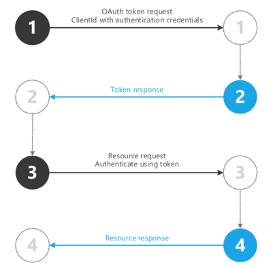
All BlinkPay API requests require authentication using OAuth 2.0 Bearer tokens. Here's the authentication flow:
Getting API Credentials
Before you can authenticate, you need a client ID and client secret. Both environments are managed in the one BlinkPay portal at merchants.blinkpay.co.nz, under Settings > API Settings, which lists a row per environment (Sandbox, Production) with its API Client ID. Users with the Administrator or Developer role can open this page; the User role cannot.
The portal never displays an existing client secret. To obtain one, open the environment's row and select Rotate Secret: a new secret is generated and shown once, in the confirmation dialog, so copy it into your secret store straight away. Rotating replaces the previous secret immediately (see Credential Rotation).
Sandbox Credentials
- Sign up at merchants.blinkpay.co.nz. Sandbox API credentials are provisioned when you sign up.
- Log in and open Settings > API Settings, then open the Sandbox row.
- Copy the API Client ID, then select Rotate Secret to obtain the client secret.
If there is no sandbox key on Settings > API Settings, select Request Sandbox API Key on that page to ask BlinkPay for one.
Production Credentials
- Complete and test your integration in sandbox.
- Select Upgrade to Production, in the top navigation bar or on Settings > API Settings. Anyone in your organisation can see the button, but an Administrator must submit the application (business details, services, banking, billing, a security questionnaire and the Client Service Agreement).
- BlinkPay reviews the application. Production upgrade approval usually takes 1-3 business days.
- Once approved, open Settings > API Settings, open the Production row, copy the API Client ID and select Rotate Secret to obtain the production secret.
Production has its own list of whitelisted redirect URLs, so register your production redirect URIs separately (see below).
Keep Credentials Secure
Never commit credentials to source control or expose them in client-side code. Store them securely using environment variables or secret management systems.
Redirect URI Whitelisting
The redirect_uri you send with a Gateway or Redirect flow consent must match a URL whitelisted for your account, otherwise the request fails with 400 (BP214 for Blink Payments, BDT211 for Blink Data). The Decoupled flow's callback_url is not checked against this list. Users with the Developer or Administrator role register URLs in the portal under Settings > API Settings: open the environment's row and use Add URL + under Whitelisted Redirect URLs. Sandbox and production have separate lists. If you don't have access, email support@blinkpay.co.nz with the URI(s) you need registered.
Two formats are supported:
| Format | Example | Matches |
|---|---|---|
| Single host | https://app.example.com/callback | https://app.example.com/callback and any path that starts with /callback, such as /callback/success |
| Wildcard subdomain | https://*.example.com/callback | Any subdomain: https://staging.example.com/callback, https://a.b.example.com/callback, etc. |
The scheme, host and port must match exactly; the host comparison is case-insensitive. The path is a prefix match on the raw string, so registering /callback accepts /callback/success but also /callbackfoo; register a path that ends in a distinct segment. A registered trailing slash makes the slash-less form fail: registering /callback/ rejects /callback, so register /callback. Query strings are ignored on both sides, so you can append your own (for example ?order=123).
Wildcard entries match subdomains only — the bare domain (example.com) is not matched by *.example.com and must be registered separately. The wildcard *. must appear at the very start of the hostname. Only a single *. prefix is allowed, and the domain after *. must have at least two labels (e.g., *.example.com is valid, *.com is not).
Custom app schemes such as myapp://callback are accepted in both environments, provided they have a host part (myapp:callback is rejected). Production rejects http:// URLs and localhost; sandbox allows them for local development.
Obtaining an Access Token
Token Endpoint
Request a token from the host of the API you are calling:
| API | Sandbox | Production |
|---|---|---|
| Blink Payments | POST https://sandbox.debit.blinkpay.co.nz/oauth2/token | POST https://debit.blinkpay.co.nz/oauth2/token |
| Blink Data | POST https://sandbox.data.blinkpay.co.nz/oauth2/token | POST https://data.blinkpay.co.nz/oauth2/token |
Request Format
The client_credentials grant type is the only supported grant type.
POST /oauth2/token HTTP/1.1
Host: sandbox.debit.blinkpay.co.nz
Content-Type: application/x-www-form-urlencoded

grant_type=client_credentials&client_id=YOUR_CLIENT_ID&client_secret=YOUR_CLIENT_SECRET
For Blink Data, send the same request with Host: sandbox.data.blinkpay.co.nz (or data.blinkpay.co.nz in production), and use the token it returns for Blink Data calls. Both products also accept client_id and client_secret as HTTP Basic credentials instead of form fields.
Blink Payments only: for language-specific examples, see the SDK documentation on GitHub.
Success Response
A Blink Payments token response:
{
  "access_token": "eyJhbGciOiJIUzI1NiIsInR5cCI6IkpXVCJ9.eyJzdWIiOiIxMjM0NTY3ODkwIiwibmFtZSI6IkpvaG4gRG9lIiwiaWF0IjoxNTE2MjM5MDIyfQ.SflKxwRJSMeKKF2QT4fwpMeJf36POk6yJV_adQssw5c",
  "token_type": "Bearer",
  "expires_in": 3600,
  "scope": "view:metadata view:single_consent create:single_consent view:enduring_consent create:enduring_consent view:payment create:payment create:quick_payment"
}
A Blink Data token response has the same shape, with Blink Data scopes, for example "scope": "manage:consents read:meta read:accounts read:balances read:transactions read:party".
Response Fields:
access_token- The Bearer token to use for API requeststoken_type- Always "Bearer"expires_in- Token lifetime in seconds (3600 = 1 hour)scope- The scopes assigned to your API client (space-separated list). You don't request scopes; see Scope Assignment
Error Responses
Blink Payments: token request failures use the standard BlinkPay error body. A wrong client ID or secret returns 401:
{
  "timestamp": "2026-10-07T10:15:30.123+13:00",
  "path": "/oauth2/token",
  "status": 401,
  "error": "UNAUTHORIZED",
  "message": "Invalid client credentials"
}
Wrong or missing credentials return 401 (an unsupported grant type, 403). Check the client ID, secret and environment; branch on the HTTP status, not the message text.
Using Access Tokens
Include the access token in the Authorization header with the Bearer prefix. A Blink Payments call:
GET /payments/v1/payments/{payment_id} HTTP/1.1
Host: sandbox.debit.blinkpay.co.nz
Authorization: Bearer eyJhbGciOiJIUzI1NiIsInR5cCI6IkpXVCJ9...
A Blink Data call:
GET /v1/accounts?consent_id={consent_id} HTTP/1.1
Host: sandbox.data.blinkpay.co.nz
Authorization: Bearer eyJhbGciOiJIUzI1NiIsInR5cCI6IkpXVCJ9...
Token Management
Token Expiration
Access tokens expire after 1 hour (3600 seconds). Your application should:
- Cache the token with its expiry time
- Request a new token before expiry (e.g., 5 minutes before)
- Handle concurrent requests with a single token refresh
Handling 401 Errors
On both products, when an API call is refused because of the access token, the 401 response has an empty body and a WWW-Authenticate: Bearer error="invalid_token" header (a bare Bearer if no token was sent). The response is the same whether the token has expired, is malformed or was not issued for this environment, so don't try to parse a body. When you receive a 401 Unauthorised response:
- Request a new token - Your token may have expired
- Retry the request - Use the new token
- Check credentials - If still failing, verify client ID and secret, and that they belong to the environment you are calling
Request IDs
Blink Payments: API responses carry a request-id header. If you send your own request-id (a UUID) it is echoed back; otherwise BlinkPay generates one. Log it with each call and include it when you contact support about a specific request.
Token Caching
Best Practice
Cache access tokens until they expire rather than requesting a new token for every API call. This reduces latency and load on the auth server.
Recommended Approach:
- Cache token with expiry time
- Refresh 5 minutes before expiry
- Handle concurrent requests with a single token refresh
- Store token in memory (not in database for each request)
OAuth 2.0 Scopes
BlinkPay uses scopes to control API access. Each product has its own set.
Payment API Scopes
Blink Payments only.
| Scope | Description |
|---|---|
view:metadata | View API metadata |
view:single_consent | Retrieve single consent details |
create:single_consent | Create single consents |
view:enduring_consent | Retrieve enduring consent details |
create:enduring_consent | Create enduring consents |
revoke:single_consent | Revoke a single consent that has not been Consumed |
revoke:enduring_consent | Revoke an enduring payment consent |
view:payment | Retrieve payment details |
create:payment | Initiate payments |
view:transaction | View transaction history |
create:quick_payment | Create quick payments |
view:quick_payment | View quick payments |
create:refund | Create refunds |
view:refund | Retrieve refund details |
create:subscription | Create webhook subscriptions |
view:subscription | View webhook subscriptions |
delete:subscription | Delete webhook subscriptions |
Revoking a quick payment uses revoke:single_consent, and Fixed Recurring Payments use the enduring consent scopes: create:enduring_consent to create one, view:enduring_consent to retrieve it and revoke:enduring_consent to cancel it.
Data API Scopes
Blink Data only.
| Scope | Endpoints |
|---|---|
manage:consents | Create, retrieve and revoke consents (POST, GET and DELETE on /v1/consents) |
read:meta | GET /v1/meta |
read:accounts | GET /v1/accounts and GET /v1/accounts/{account_id} |
read:balances | GET /v1/accounts/{account_id}/balances |
read:transactions | GET /v1/accounts/{account_id}/transactions and all statement endpoints (list, single statement and statement file) |
read:party | GET /v1/party and GET /v1/accounts/{account_id}/party |
The consent must also carry the matching permission (for example ReadStatements) for each data call.
Scope Assignment
You don't request scopes. BlinkPay assigns them to your API client, and every token carries all of them in its scope field. Contact support if you need a scope you don't have.
Scope Restrictions
If you attempt to use an API endpoint without the required scope, you'll receive a 403 Forbidden error.
Security Best Practices
For the full set of expectations on handling credentials and securing your integration, see Credential and Integration Security.
Credential Storage
Store credentials securely using environment variables or secret management systems (AWS Secrets Manager, HashiCorp Vault). Encrypt credentials at rest and restrict access to necessary personnel only. Never commit credentials to source control, store them in code files, expose them in client-side code, or share them via email or chat.
Token Security
Transmit tokens over HTTPS only and store them in memory rather than localStorage in browsers. Implement token rotation if a compromise is suspected, and log authentication failures for monitoring. Never log full access tokens, send tokens in URL parameters, store tokens in cookies without secure flags, or share tokens between services unnecessarily.
HTTPS Only
All API calls must use HTTPS. HTTP requests will be rejected.
Credential Rotation
Rotate credentials every 90 days, immediately if compromised, or when staff with access leave. Use the Client Portal to rotate your client secret (Settings > API Settings, open the environment's row, Rotate Secret).
There is no grace period. The old secret stops working for new token requests the moment you rotate. Access tokens already issued are not stopped: they keep working until they expire, which by default is one hour after they were issued. Have the new secret ready to deploy as soon as it is shown, and expect token requests from anything still holding the old secret to fail with 401 until it is updated.
Using Client SDKs
Blink Payments: the official Blink Payments SDKs (Java, Node.js, .NET and PHP, on GitHub) handle authentication automatically. Provide your credentials and the SDK manages the token lifecycle for you.
Blink Data: there is no SDK. Call the API over HTTPS with any HTTP client, requesting and caching tokens as described above. The Postman Collection has ready-made Blink Data requests to start from.
Testing Authentication
Use sandbox credentials to test authentication without affecting production. The Postman Collection includes a pre-configured "Generate access token" request.
Troubleshooting
For common authentication errors (invalid credentials, expired tokens, grant type issues) and their solutions:
Next Steps
- Gateway Flow - Start your integration with BlinkPay's hosted bank selection page