Recurring Payments
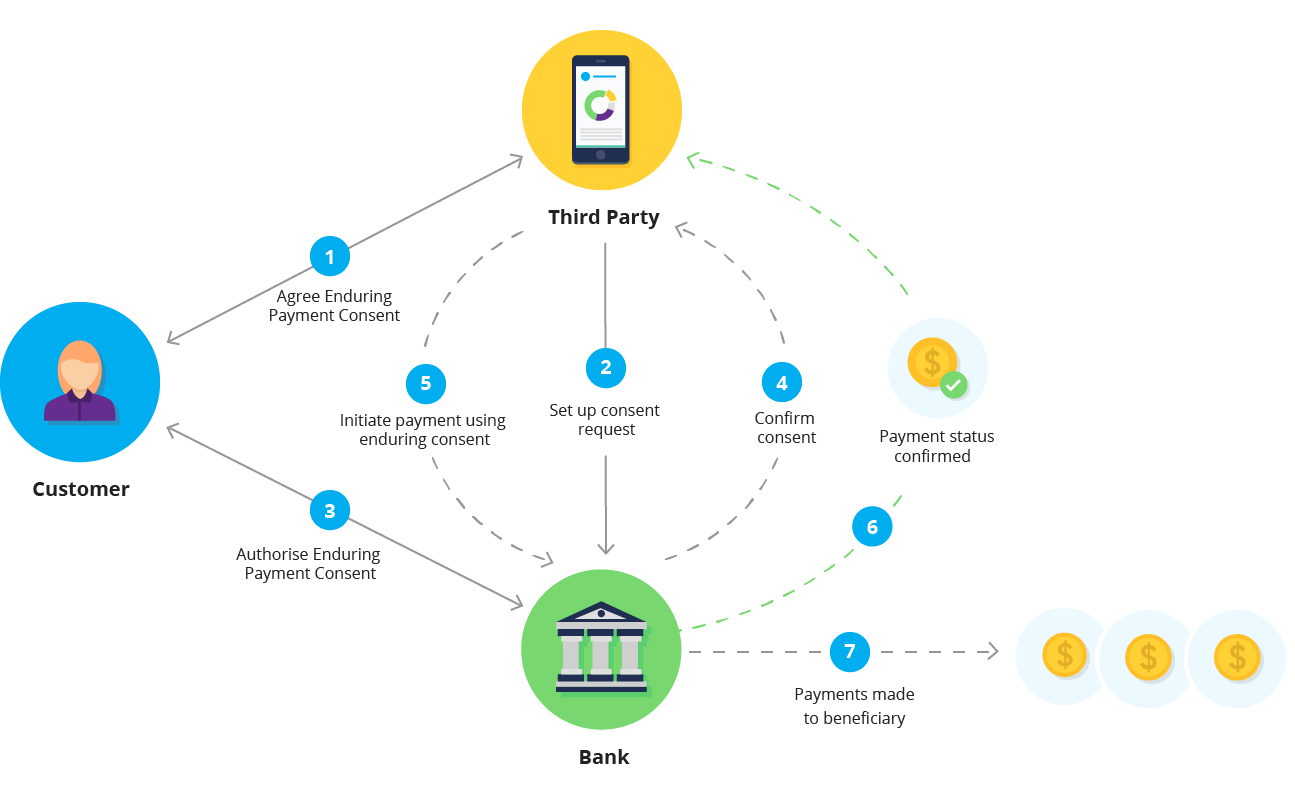
AutoPay uses enduring consents for recurring payments. Enduring consents authorise multiple payments over time within predefined limits. Once authorised, payments can be initiated on a regular schedule without requiring authorisation for each payment.
Choosing Your Approach
BlinkPay offers two ways to handle recurring payments:
| Approach | Description | Best For |
|---|---|---|
| Variable Recurring | You initiate each payment via API, controlling timing and amount | Usage-based billing, variable subscriptions, instalments |
| Fixed Recurring | BlinkPay automatically executes payments on schedule (requires an authorised enduring consent) | Fixed-fee subscriptions, charity donations, loan repayments |
Which should I use?
- Variable Recurring (this page): Use when payment amounts change, you need custom timing logic, or you want full control over when payments are taken.
- Fixed Recurring: Use when the same amount is charged on a regular schedule and you want BlinkPay to handle the automation.
This page covers Variable Recurring Payments where you control payment initiation. For automated fixed-amount payments, see Fixed Recurring Payments.
How Enduring Consents Work
Important Limitations
Consent Immutability
Once an Enduring Payment Consent is submitted, its parameters (amount ranges, expiry date, etc.) cannot be changed. A new consent must be issued to modify any parameters.
Account Closure
If a customer's bank account is closed, all Enduring Payment Consents linked to that account are no longer valid for use.
Creating an Enduring Consent
Request:
POST /payments/v1/enduring-consents HTTP/1.1
Host: sandbox.debit.blinkpay.co.nz
Authorization: Bearer {access_token}
Content-Type: application/json
idempotency-key: 1f5b9d3a-7c2e-4a6b-8d4f-3e9a1c7b5d2f
request-id: 7a3d1f9b-5e2c-4b8a-9f6d-4c2e8a0b6d1f

{
  "flow": {
    "detail": {
      "type": "gateway",
      "redirect_uri": "https://www.blinkpay.co.nz/sample-return"
    }
  },
  "maximum_amount_period": {
    "total": "5001.00",
    "currency": "NZD"
  },
  "maximum_amount_payment": {
    "total": "5001.00",
    "currency": "NZD"
  },
  "period": "fortnightly",
  "from_timestamp": "2025-10-15T13:21:00+12:00",
  "expiry_timestamp": "2026-10-15T13:21:00+12:00"
}
Response:
{
  "consent_id": "8f7e6d5c-4b3a-2c1b-0a09-8f7e6d5c4b3a",
  "redirect_uri": "https://sandbox.debit.blinkpay.co.nz/gateway/pay?id=8f7e6d5c..."
}
Store consent_id against the customer, then redirect them to redirect_uri to complete authorisation. If the create request times out, send it again unchanged, with the same idempotency-key (redirect and decoupled) or request-id (gateway).
Consent Parameters
Required Fields
| Field | Type | Description |
|---|---|---|
flow | object | Authentication flow configuration |
maximum_amount_period | object | Maximum total amount per period |
period | string | Billing period type |
from_timestamp | string | Period calculation start (ISO 8601) |
Optional Fields
| Field | Type | Description |
|---|---|---|
expiry_timestamp | string | When consent expires (null for indefinite) |
maximum_amount_payment | object | Maximum amount per single payment |
Date Validation Rules
| Rule | Description |
|---|---|
from_timestamp | Required. May be in the past or the future — it anchors the consent period |
expiry_timestamp | Must not be in the past (or null for indefinite) |
| Order | from_timestamp must not be after expiry_timestamp |
Period Types
| Period | Description |
|---|---|
daily | Every day |
weekly | Every 7 days |
fortnightly | Every 14 days |
monthly | Every month, counted from the from_timestamp date |
annual | Every year, counted from the from_timestamp date |
Period Limits Reset
The maximum_amount_period limit resets at the start of each period. Periods are counted from the date of from_timestamp, not from the authorisation date and not from the first of the month. A monthly consent with a from_timestamp on 15 March has periods 15 March to 14 April, 15 April to 14 May, and so on. A period that starts on the 31st ends early in a shorter month and returns to the 31st afterwards.
Expiry and Renewal
A consent with an expiry_timestamp can't be used after that time: it is Consumed, and a payment against it is refused with 422 BP003.
Sending no expiry_timestamp gives a consent with no end date; it stays valid until revoked.
Consents can't be extended or edited. To continue after a consent expires, or to change its amounts or period, create a new consent and have the customer authorise it, ideally before the old one runs out.
Creating Payments
Once an enduring consent is authorised, create payments against it:
Request:
POST /payments/v1/payments HTTP/1.1
Host: sandbox.debit.blinkpay.co.nz
Authorization: Bearer {access_token}
Content-Type: application/json
idempotency-key: e2a6c0f4-8b3d-4e1a-9c7f-6b4d2a8e0c3b

{
  "consent_id": "8f7e6d5c-4b3a-2c1b-0a09-8f7e6d5c4b3a",
  "amount": {
    "total": "99.00",
    "currency": "NZD"
  },
  "pcr": {
    "particulars": "Subscription",
    "code": "Month 1",
    "reference": "Service"
  }
}
PCR Field Limits
Each PCR field (particulars, code, reference) has a maximum length of 12 characters. Requests with longer values are rejected with a 400 validation error.
Response (201 Created):
{
  "payment_id": "9f8e7d6c-5b4a-3c2b-1a09-8f7e6d5c4b3a"
}
Store the payment_id and poll GET /payments/v1/payments/{payment_id} every second until it is AcceptedSettlementCompleted or Rejected, within your polling window. Payments on one consent run one at a time: while a payment is still in progress, a new POST on the same consent is refused with 409.
Always send an idempotency key
Send a fresh UUID in idempotency-key for each payment you intend to make, and reuse it only to retry that same payment. Without one, a retry can charge the customer twice.
Payment Amount Rules
| Rule | Description |
|---|---|
| Minimum | $0.01 NZD |
| Maximum per payment | Must not exceed maximum_amount_payment (if set) |
| Period maximum | A single payment must not exceed maximum_amount_period |
| Period total | Sum of payments in period must not exceed maximum_amount_period |
| Consent status | Consent must be Authorised |
A payment outside these rules is refused with a 400 or 422 and a code saying why; the Error Codes Reference lists them. Keep a running total per period in your own system.
On a surcharged consent, the period limit the customer's bank applies is the raised maximum_amount_period; see Surcharging.
Retrying a Payment
You start every payment on an enduring consent, so retries are your decision. Handle failures generically:
- No clear answer (timeout, network error or
5xx): retry with the same idempotency key. You get the original payment back if it was created, and a409if the first request is still in progress, which you can retry after a few seconds. 409: another request on this consent is in progress. Read thecodeandmessage: they name the payment to poll, or tell you to retry.400or422: the request can't succeed as sent. Read thecode: the amount is outside the consent's limits, the period's allowance is used up, or the consent is revoked or expired. Adjust the amount, wait for the next period, or ask the customer to authorise a new consent.- Payment
Rejected: the bank declined it, for example for insufficient funds; there is no reason field. Don't retry automatically: tell the customer, and when you do try again use a new key.
The codes are in the Error Codes Reference.
Detecting Revocation
Customers can revoke an enduring consent in their banking app at any time. BlinkPay checks with the bank when the consent is read or a payment is attempted, so a revocation made at the bank shows as Revoked on the next GET /payments/v1/enduring-consents/{consent_id}, and a POST /payments on a revoked consent returns 422 BP015. Read the consent before each payment run, and handle BP015 by stopping payments on that consent. If the consent has an active Fixed Recurring Payment, the schedule is cancelled and its fixed-recurring-payment-cancelled webhook fires. See Notifications.
Surcharging
Surcharging, also called fee forwarding, passes BlinkPay's transaction fee for each payment on to your customer. BlinkPay can enable surcharging on enduring consents for your merchant account on request, once your BlinkPay invoices are paid by direct debit. This is separate from surcharging on one-off payments, described in Surcharging (Fee Forwarding): having one enabled does not enable the other.
Which payments are surcharged. A payment is surcharged only if surcharging on enduring consents was enabled when its consent was created and is still enabled when the payment is made. Consents created before it was enabled are never surcharged. If it is switched off later, payments on existing consents stop being surcharged, even though the customer authorised the raised amounts.
At consent creation, the consent's maximum amounts are raised by the surcharge, and the customer's bank is asked to authorise the raised amounts. maximum_amount_payment is raised by its own surcharge, and maximum_amount_period by the same proportion, or by its own surcharge when you don't send maximum_amount_payment. The raised maximum_amount_payment (or, if you don't send one, the raised maximum_amount_period) is checked against the payment limits. If it is over your account's payment limit, the consent is rejected with BP277. If it is over the bank's limit, the consent is rejected with BP229, or BP287 when you don't send maximum_amount_payment (bank limits are listed under Payment Limits); for gateway consents this is checked once the customer chooses their bank. So a consent that is just under a limit can be rejected once surcharging is enabled.
Each payment is surcharged at the current rate, up to what the consent's raised amounts allow, so a surcharge may be reduced or not charged. The customer is debited the payment's amount.total plus its surcharge. Each payment's amount.total must still be within the maximum_amount_payment you sent. The period limit the customer's bank applies is the raised maximum_amount_period, so if surcharges are reduced or switched off, a period's payments can total slightly more than the maximum_amount_period you sent.
How much is recovered. If rates rise after the consent is created, the surcharge is capped at what the consent allows. Otherwise, with a percentage-only fee, each payment is surcharged in full, less a few cents of rounding. When the fee includes a fixed amount or a cap, a payment smaller than maximum_amount_payment, or any payment on a consent without it, may be surcharged less. To recover the full surcharge, set maximum_amount_payment to the largest payment you expect to take.
In responses, a surcharged consent's maximum_amount_payment and maximum_amount_period carry surcharge and total_charge, the raised amount the customer authorises. For example, a $50.00 / $200.00 consent at an illustrative 4% surcharge:
"maximum_amount_payment": {
  "total": "50.00",
  "surcharge": "2.00",
  "total_charge": "52.00",
  "currency": "NZD"
},
"maximum_amount_period": {
  "total": "200.00",
  "surcharge": "8.00",
  "total_charge": "208.00",
  "currency": "NZD"
}
Each surcharged payment carries detail.amount.surcharge and detail.amount.total_charge, the amount debited.
Checking Consent Status
Request:
GET /payments/v1/enduring-consents/{consent_id} HTTP/1.1
Host: sandbox.debit.blinkpay.co.nz
Authorization: Bearer {access_token}
Response:
{
  "consent_id": "8f7e6d5c-4b3a-2c1b-0a09-8f7e6d5c4b3a",
  "status": "Authorised",
  "creation_timestamp": "2025-10-15T10:00:00+12:00",
  "status_updated_timestamp": "2025-10-15T10:05:00+12:00",
  "detail": {
    "type": "enduring",
    "flow": {
      "detail": {
        "type": "gateway",
        "redirect_uri": "https://www.blinkpay.co.nz/sample-return"
      }
    },
    "maximum_amount_period": {
      "total": "5001.00",
      "currency": "NZD"
    },
    "maximum_amount_payment": {
      "total": "5001.00",
      "currency": "NZD"
    },
    "period": "fortnightly",
    "from_timestamp": "2025-10-15T13:21:00+12:00",
    "expiry_timestamp": "2026-10-15T13:21:00+12:00"
  },
  "payments": []
}
Revoking a Consent
To cancel a customer's consent, for example when they cancel their subscription, revoke it:
Request:
DELETE /payments/v1/enduring-consents/{consent_id} HTTP/1.1
Host: sandbox.debit.blinkpay.co.nz
Authorization: Bearer {access_token}
Response: 204 No Content
Immediate Effect
Once revoked, the consent cannot be used for any further payments. A new consent must be created if the customer wants to resume.
Use Cases
Monthly Subscription
| Parameter | Value |
|---|---|
period | monthly |
maximum_amount_period | Fixed subscription amount |
maximum_amount_payment | Same as period amount |
expiry_timestamp | null (indefinite, where the bank allows it; see Expiry and Renewal) |
Instalment Plan
| Parameter | Value |
|---|---|
period | monthly |
maximum_amount_period | Monthly instalment amount |
expiry_timestamp | Date after final instalment |
Variable Usage Billing
| Parameter | Value |
|---|---|
period | monthly |
maximum_amount_period | Maximum expected monthly usage |
maximum_amount_payment | Maximum single charge |
Choosing Enduring Consents
Enduring Consents differ from Quick Payments and Single Consents in that they authorise multiple payments over time within defined limits. A single authorisation allows you to initiate payments repeatedly without customer intervention for each transaction.
For a detailed comparison of all consent types, see Consent Types.